Kayıtlar

delphi etiketine sahip yayınlar gösteriliyor

Delphi - What does Abort/Break/Exit

Resim
Abort Break Exit FormCreate - 1 FormCreate - 1 FormCreate - 1 MyLoop - 1 MyLoop - 1 MyLoop - 1 MyLoop - 2 MyLoop - 2 MyLoop - 2 MyLoop - 3 FormCreate - 2 FormCreate - 2 Abort Raises a silent exception. Use Abort to escape from an execution path without reporting an error. Abort raises a special "silent exception" ( EAbort ), which operates like any other exception, but does not display an error message to the end user. Abort redirects execution to the end of the last exception block. Break Causes the flow of control to exit a for, while, or repeat statement. The Break procedure causes the flow of control in Delphi code to exit a for, while, or repeat statement and continue at the next statement following the loop statement. A call to Break must be contained in a for, while, or repeat statement; otherwise, the compiler reports an...
$REGION

Resim
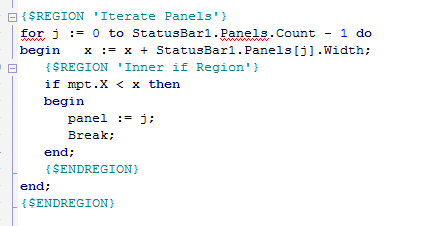
The IDE supports since Delphi 2005 code folding of marked regions. {$REGION 'Hidden Code'} Beep; Beep; Beep; {$ENDREGION} folds down to just Hidden Code in the IDE editor window. Source:  http://www.tindex.net/Language/$REGION.html Kodlarınızda aşağıdaki gibi REGION tanımlarınızı yaptığınızdaki o kodu açtığınızda ikince resimdeki gibi yaptığınız tanımlar gözükecek istediğin iz kodu açıp inceleyebilirsiniz bu şekilde daha temiz bir görüntü elde etmiş olacaksınız. İkinci resimdeki görüntü geçen gün gönderdiğim More Coding in Delphi kitabında bahsedilen Spring framework’ünün sourcelarından alınmıştır.

Delphi - cxLookupCombobox'a buton ekleme

Resim
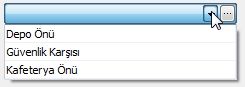
Aşağıdaki kodla MRUEdit gibi cxLookupCombobox’a button ekleyip, butonlara da kendi yazdığınız ya da herhangi bir OnButtonClick event’ini bağlayabilirsiniz. Event’de AbuttonIndex kontrolü yapmazsanız LookupCombobox’ın standart butonu içinde –Liste açıkken tıklarsanız- yazacağınız kod çalışıyor. –Başka bir amaç için ihtiyacaç olabilir- type TcxCustomEditPropertiesAccess = class(TcxCustomEditProperties); ... TcxCustomEditPropertiesAccess(cmb_Park_Group.Properties).OnButtonClick := myPropertiesButtonClick; //event bağla with TcxCustomEditPropertiesAccess(cmb_Park_Group.Properties).Buttons.Add do begin Kind := bkEllipsis; LeftAlignment := True;  //Butonları sol tarafa alır end; procedure TForm1.myPropertiesButtonClick(Sender: TObject; AButtonIndex: Integer); begin if AButtonIndex = 1 then begin ShowMessage('TEST'); end;

Delphi - Event Override via Interceptor Class

Aşağıdaki şekilde mevcut bir type'ın bir özelliğini (event) override edebilirsiniz. Örnekte TButton'ın click event'ının procedure'ü override ediliyor. Bu işlemi ya etkilenmesini istediğini formda yapmanız gerekiyor ya da başka bir form/unit'de yaptıysanız override işlemini yaptığınız bileşenin uses'ını ilgili bileşene ait olan uses'dan sonra yazmalısınız (bu örnek için bu kodu Global_Unit diye bir dosyada yaptıysanız uses'da Global_Unit'i en sonda ya da en azından Vcl.StdCtrls -bileşenin uses dosyası- ndan sonra eklemelisiniz. Most importantly, add the "button_interceptor" unit in the uses list as the last unit listed , or at least after the "stdctrls" unit! type   TButton = class(Vcl.StdCtrls.TButton)   public  procedure Click; override;  end; Kaynak: http://delphi.about.com/od/delphitips2009/qt/interceptor.htm